Teachers, trainers, and content creators often face a big problem when it is turning written lessons into videos. This is because it takes a lot of time with recording, editing, and fixing mistakes. Videos are really important today. Employees need quick instructions. Students want easy-to-understand explanations. On the other hand, online courses rely on good visuals.
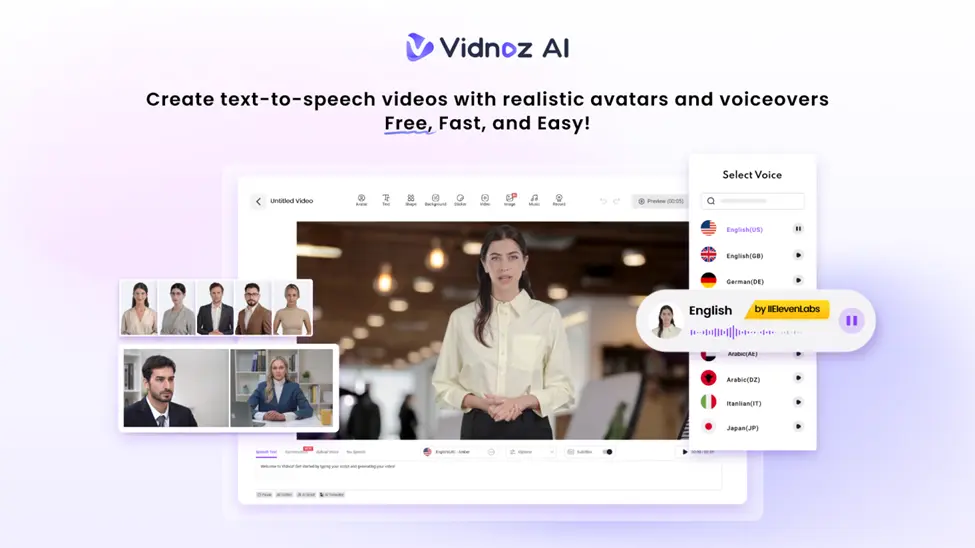
However, it feels like a full time job to make a new video every time you have new material to share. That is where Vidnoz AI helps. It lets you turn simple text into clear and interesting educational videos in just minutes. You just type your message, and Vidnoz AI does the rest for you instead of dealing with cameras and editing.
Vidnoz AI Offers Fast Video Creation with Strong Data Protection
Vidnoz AI is a simple tool made for teachers, trainers, course creators, and businesses that need to make videos quickly and easily. One of its best features is keeping your data safe. Vidnoz AI has a special ISO/IEC 27001:2022 certification. It means the tool follows strict rules to protect your information. This gives teachers and companies’ peace of mind. This is especially when they are making videos that might include private or sensitive details.
The platform helps you turn your written materials like lesson plans, scripts, notes, or training documents into polished and clear videos that fit your learning needs. It is a fast and secure way to create professional videos without any hassle.
Key Features of Vidnoz AI for Easy and Fast Video Creation
Vidnoz AI makes turning text into videos much easier and faster. This is especially for education and training. Here are the key features explained simply:
Over 1,800 Natural-Sounding Voices
Vidnoz AI offers a huge variety of voices that match your avatars perfectly. You can pick friendly, warm, serious, or neutral voices depending on your lesson. The voices sound smooth, natural, and not robotic. This helps to make explanations easier to understand. This diversity allows instructors to find the appropriate tone of various subjects, both basic and higher training.
More Than 2,800 Ready-to-Use Video Templates
Teaching, training, onboarding, and workplace instructions templates are available in thousands. These templates save you from starting with a blank screen. So, you can create videos much faster. They cover many topics like science, computer skills, safety, and more.
Even more, many templates come in different languages. This is making it easy to prepare lessons for global or bilingual classes.
Free 2 Minutes of Video Creation Every Day
The Vidnoz AI provides you with two minutes of free video per day. It works best with brief lessons, reminders and announcements. This free time can be used by the teachers to prepare instructions on homework or explain little ideas without any payment.
Realistic Avatars Made Easy with Vidnoz AI
Vidnoz AI offers over 1,700 lifelike avatars from many different roles like teachers, doctors, students, hosts, and support staff. This wide choice helps educators create videos that fit their subject and audience perfectly.
- Avatar Lite lets you quickly create a simple avatar without spending much time on details.
- Custom Avatar Pro is for those who want more control. It will be allowing you to change backgrounds, styles, and make the avatar match your teaching setting.
- Motion Avatars add natural body movements, hand gestures, and facial expressions. This is making your videos feel more alive and engaging.
Vidnoz AI can create a digital twin of you. You can create an avatar that looks and sounds like you and can speak over 140 languages. This helps you connect better with students from different places and keeps your lessons consistent.
Steps to Turn Your Text into Educational Videos Quickly
Vidnoz AI makes creating videos simple, even if you’ve never done it before. Here’s a quick 5-step guide to show how you can go from writing your lesson to having a finished video without any stress:
Sign Up or Log In
Start by making a free account or logging in if you already have one. The dashboard is easy to use. So, you don’t need any special skills or long tutorials.
Choose a Template or Avatar
Pick from thousands of ready-made templates or select an avatar that fits your lesson style. This step helps you set the look and feel before you add your text.
Add and Customize Your Content
Write your lesson text, instructions or notes. You can improve the text, select the voice, and change the speed of the speech. You can also determine what images will appear in each section of the video. This aids in the division of long information into clear-cut and easy to understand parts.
Generate Your Video
Click the generate button, and Vidnoz AI will do the rest. No need for cameras or video editing software, which saves you a lot of time and effort.
Download or Share Your Video
Once your video is ready, you can download it or share it directly with your students or team. You can upload it anywhere you want.
Why Teachers Love Turning Text Into Videos?
Teachers and trainers everywhere are using text-to-video tools. Here is why students and educators find video lessons so helpful:
- Watching videos with pictures and sound helps students understand ideas faster than just reading long notes.
- You can turn one written lesson into a video in minutes, so you don’t have to record the same thing over and over.
- Teachers can make the same lesson in different languages without having to record again, helping students who speak different languages.
- Students can watch and re-watch parts of the video whenever they want, which helps them feel more confident.
- Videos work well for students learning from home or different places, making lessons easy to share anywhere.
Final Thoughts
Vidnoz AI makes it easy for anyone to make education videos. You can now turn simple text into helpful educational videos without spending hours recording or editing. It keeps your information safe with strong security standards. This means you can create clear and professional videos in no time.
Also Read-Why is Student Interest in Tech High?